.
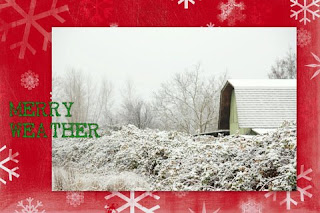 If you have a snow setting on your camera, be sure to use it!
 In a snow environment, your camera thinks there is too much light and darkens your photos. The snow setting will take a more normal exposure for you.
If you are shooting in manual mode or similar, take a test shot and use your exposure compensation to get a lighter result.
To lighten a dark snow photo, open photo in editing program, copy to a layer, set blending mode to screen. If this is too light, reduce opacity. If it is too dark, copy the layer again until the photo is correct. If the final layer is too bright, the opacity will help you to refine. Flatten. Save.
In Picasa, First gently use the highlights slider watching to preserve detail in the photo's brightest spots. Then carefully use the fill light slider. For the snowiest of snow photos, go to the "glow" effect. Reduce slider if need be, apply. Next go to sharpening, use the slider and watch to see if the sharpening improves your photo, apply if you like it, cancel if not.
*The glow effect is fabulous on snow photos, you gotta try it.(paper by Summer Driggs)